

Salaath Shaikh®
Upstox · 0-to-1 product launch · 2025

Building NPS from 0 to 1 on Upstox

I led the design of NPS on Upstox, from product vision to launch: education, account setup, fund selection, contributions and portfolio, in one journey. It went live to every Upstox user in March 2025, before tax season. A first contribution now takes under 3 minutes.

Product

National Pension System (NPS)

Scope

0-to-1 product experience

Design timeline

3 weeks, Jan–Feb 2025

Launch

March 2025

Team
  • SalaathLead Product Designer
  • Yadarth SahuProduct Manager

This wasn’t a redesign. Upstox had no NPS journey to improve, so the work was to define what it should be, understand the landscape, design it end to end and take it live.

[ The opportunity ]

Retirement investing was a natural next step for Upstox

NPS gave Upstox a way to help customers plan for retirement and expand into a longer-term investment need. But it meant more than adding another product tile. A regulated, unfamiliar product had to make sense inside an app people already knew.

For customers

Help people plan and secure their retirement.

For the product

Expand what Upstox offers into a longer-term investment need.

For access

Cut the clutter around retirement planning with a simpler way in.

For the relationship

Build a longer-term engagement with investors.

[ Setting the ambition ]

Before designing the first version, we defined what great could look like

We didn’t want to start with a list of screens. With the product manager, I worked through an 11-star exercise to map the ambition into stages: what a functional first release needed, what would make it more useful and what a complete retirement experience could eventually offer.

3★
  • Tier I opening and investing
  • Charges visible
  • Plan selection
5★
  • Education on investing right
  • NPS calculator
7★
  • Portfolio tracking
  • Statements and holdings
  • Everything in 5★
11★
  • Account shifting
  • Withdrawals
  • Corporate NPS

[ The existing landscape ]

NPS had established players. The experience still felt fragmented.

Before defining the Upstox journey, I looked at how people were already getting to NPS. Several Central Recordkeeping Agencies serve the market, with different portals and processes for opening and servicing an account.

CRASubscriber share, excl. APYNew sign-ups
Protean / NSDL~86–87% (estimate)95% of all additions, including APY
KFintech12.2%22%
CAMSUnder 1% (estimate)~10% of retail / eNPS

Mid-2025 figures, for context. The new sign-up numbers use different bases, so they don’t add up to one distribution.

[ First-hand teardown ]

I went through the existing journeys myself

I reviewed the Protean eNPS and KFintech journeys, the two record-keepers that serve almost the whole market and completed eNPS registration myself. The point wasn’t to prove every step wrong. It was to see what someone is asked to know, decide and provide.

Protean eNPS

I completed this registration myself
What the screen asksWhat you need to understandWhy it can slow someone down
Subscriber and account type, before anything elseWhat the account types mean and which one applies to youA product decision arrives before the product has been explained
Parents’ names, place of birth and identity proofWhich details have to match your documentsA long form to get through before you’ve seen what you’re getting
An acknowledgement number to keep and OTPs and captchas to finishThat the number matters for what comes nextKeeping track of the process is left to the user

KFintech

Distributor-assisted, in KFintech IRIS
What the screen asksWhat you need to understandWhy it can slow someone down
PAN and date of birth, checked against KYC and an AML databaseWhy a pension account opens with a compliance checkThe investor relies on the distributor to explain each step
Tier, fund manager and Auto or Active allocationWhat lifecycle funds and the E, C, G split meanFund managers are listed without returns and in the recording the chart legends read “Label for Equity”
A photo, a signature, the PAN card and a cancelled cheque for each tierWhich files are needed and in what format and sizeFive uploads mean stepping away to find documents

[ The problem ]

The product had value. Getting started asked people to know too much.

Tier I or Tier II?Active or Auto choiceAggressive, Moderate, ConservativeAsset classes E, C, G, A10 pension fund managers80CCD(1B): ₹50,000Locked in till 6060% lump sum, 40% annuityPRAN, POP, CRA, PFMUnits credited on day 4~30 kinds of chargesFATCA declaration

Existing journeys often introduced these requirements before people had enough understanding to decide with confidence. The challenge wasn’t only the number of screens. It was how much unfamiliar information people had to process while completing a financial task.

Problem statement

How might we make it easier for Upstox customers to understand NPS, make informed choices and open an account, without a separate, jargon-heavy process?

The decisions behind it
  • How much should I contribute?

    Am I getting the full tax benefit?

  • What plan should I choose?

    What are these plans? Should I be safe?

  • How do I compare fund managers?

    Which provider should I pick? Who is better?

  • What will it cost?

    What are the charges? What am I agreeing to?

  • What happens after I invest?

    Has my money gone through? Is it growing enough?

Design considerations from our emotion mapping, not verbatim research quotes.

[ The design approach ]

We designed around the decisions people needed to make

Instead of treating NPS as a form to complete, we organised the experience around what someone is trying to do.

  1. 1Understand the benefit
  2. 2Decide how much
  3. 3Choose a plan and fund
  4. 4Complete the details
  5. 5Confirm the order
  6. 6Track the investment

[ Testing the first version ]

We tested a short first version and our assumptions didn’t hold

We had to launch before the financial year ended, so we built the first version fast and took it straight to the floor. We ran 12 sessions with users in the office and took people from product management, tech, development and business through it too.

Version 1 was built for speed: four steps to Invest, with education there only if people asked for it. What we learned went into the final version, which launched in March, before the end of tax season.

Version 1 · four steps to Invest12 sessions in the office
  1. Version 1, More: NPS sits under Tax

    1More · NPS sits under Tax

  2. Version 1, Explore: Truths on demand, then funds

    Scroll the screen

    2Explore · Truths on demand, then funds

  3. Version 1, Fund details: CAGR first

    Scroll the screen

    3Fund details · CAGR first

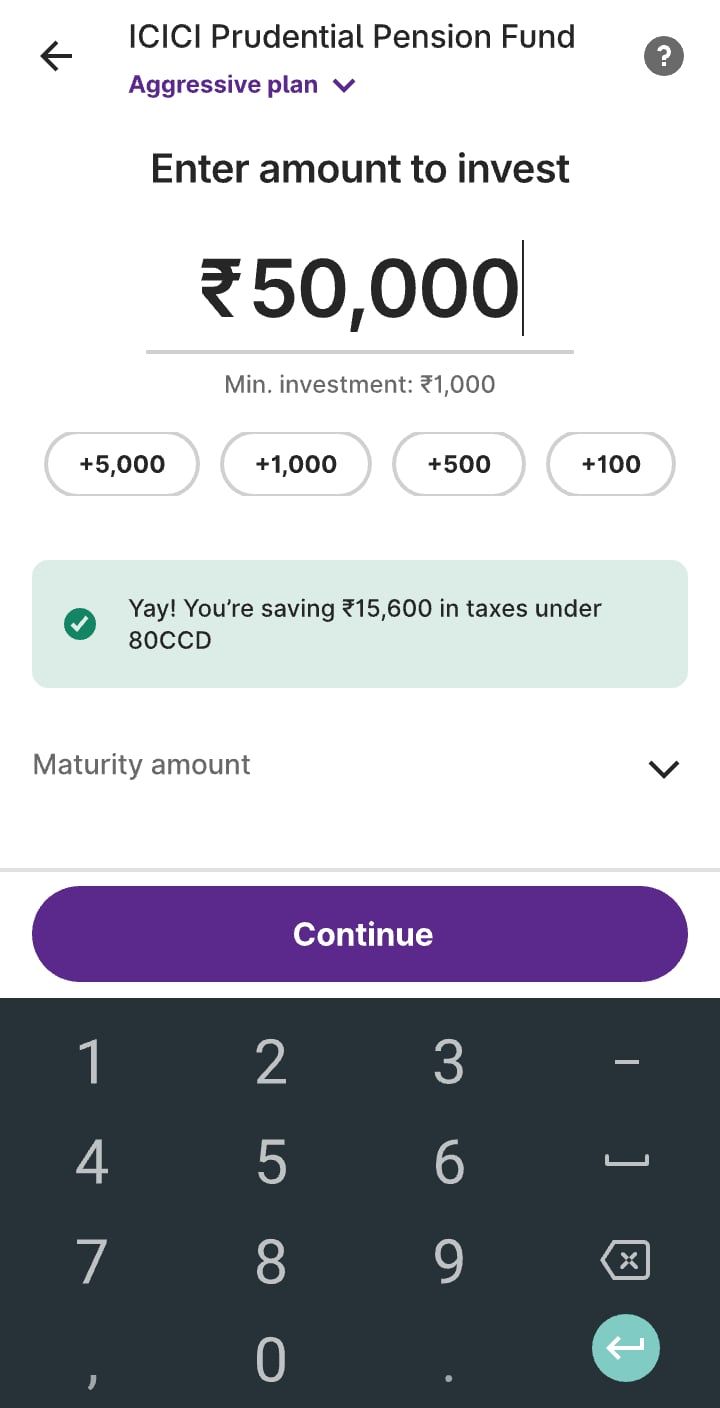
  4. Version 1, Amount: Enter and invest

    4Amount · Enter and invest

What we assumed and what we heard

01

We assumed

People already knew what NPS was

In version 1
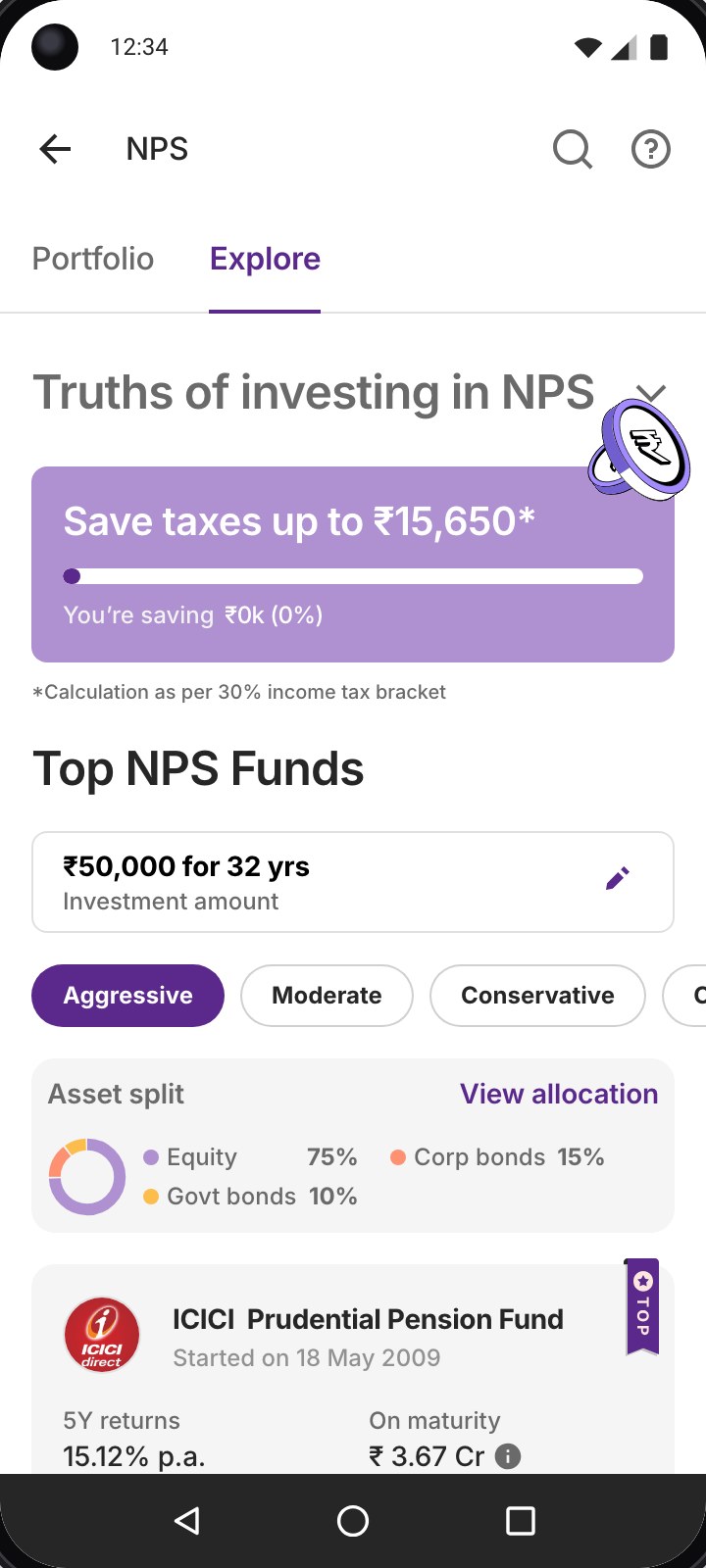
To keep the journey short, education was on demand: a collapsed ‘Truths of investing in NPS’ row, then straight to funds.
What we heard
This was the biggest miss. Most people didn’t know how much tax NPS could save them, or the most they could save in a year.
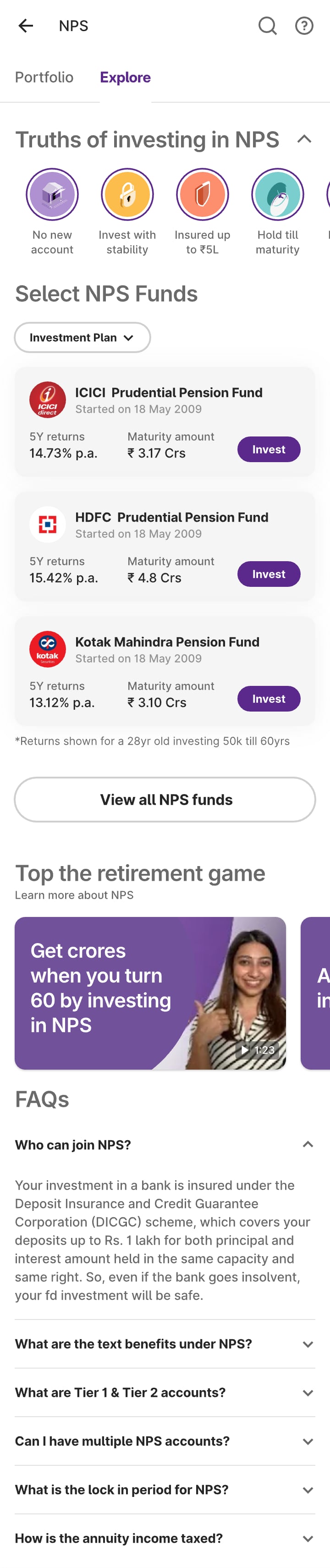
Version 1 Explore: a collapsed truths row, then three funds

Scroll the screen
02

We assumed

Returns and maturity were enough to pick a fund

In version 1
Funds showed the two numbers we thought mattered most: 5Y returns and the maturity amount.
What we heard
NPS was still new and so were these pension funds. People wanted to know how risky each one was before picking.
Version 1 fund list: 5Y returns and maturity amount only

Scroll the screen
03

We assumed

People wouldn’t want to explore different investment plan types

In version 1
We had already picked the best default plan for their age, so the other plan types were hidden in a bottom sheet behind an ‘Investment plan’ filter.
What we heard
People wanted to know up front why that plan was picked for them. For them it was part of the decision, not a setting.
Version 1 plan sheet, opened from a filter
04

We assumed

Performance was what people looked for first

In version 1
Fund details opened on CAGR, with a calculator to compare the fund’s returns across plan types.
What we heard
People looked for the maturity amount first and found the calculator complex.
Version 1 fund details: CAGR chart and plan calculator

Scroll the screen
05

Something we hadn’t planned for

How does NPS compare?

Version 1 didn’t compare NPS with anything. People asked how it stacks up against PPF, the retirement product they already knew and against putting the same ₹50,000 into equity themselves. They asked for a returns calculator.

[ The final design ]

What testing changed

Each finding became a change. The path to Invest got two steps longer, contribution and plan, because people wouldn’t decide without them.

01People didn’t know what NPS was

NPS explained on the first visit

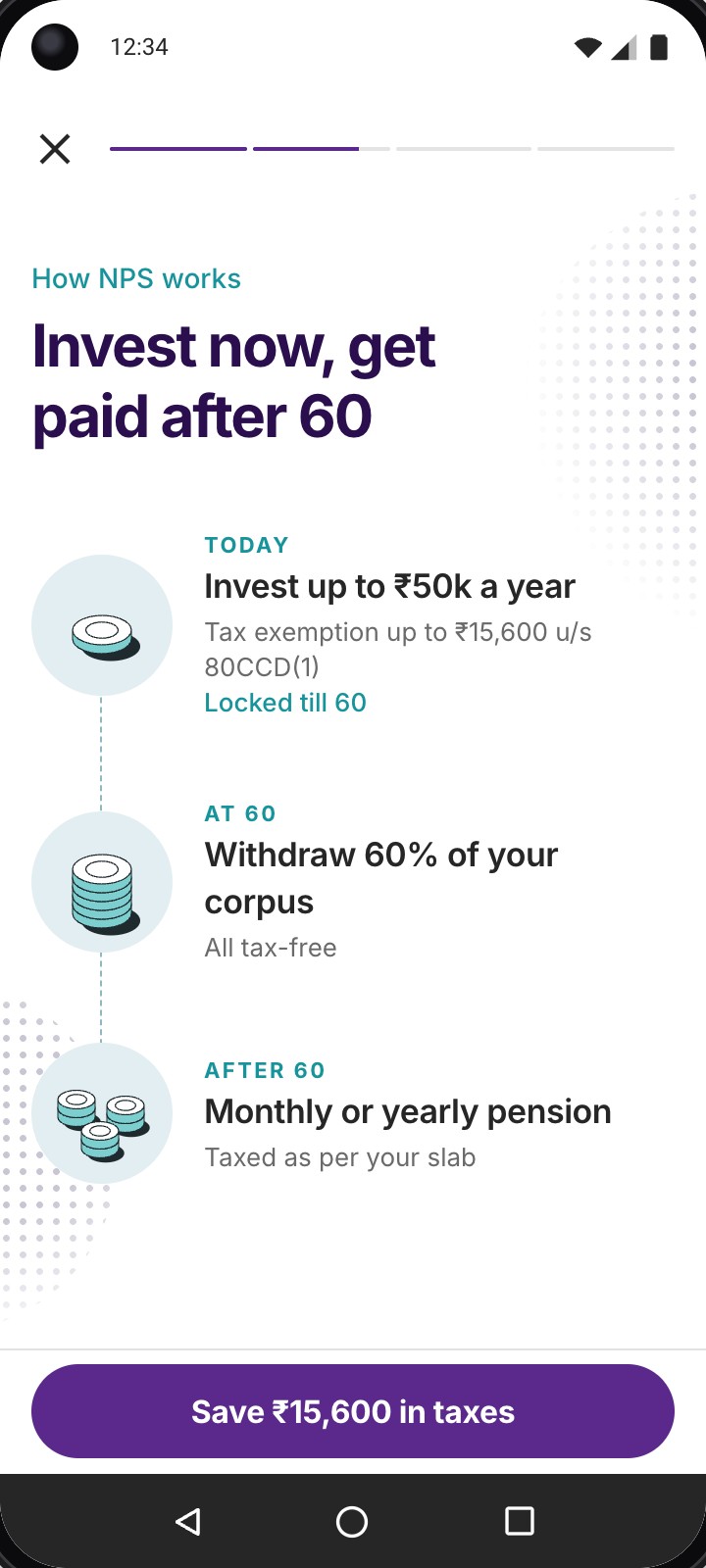
The first time someone lands on NPS, short stories explain what it is, how it works, the tax benefit and when money comes out.

Story: how NPS works, invest now and get paid after 60

02People didn’t know what they’d save

Tax saving comes first

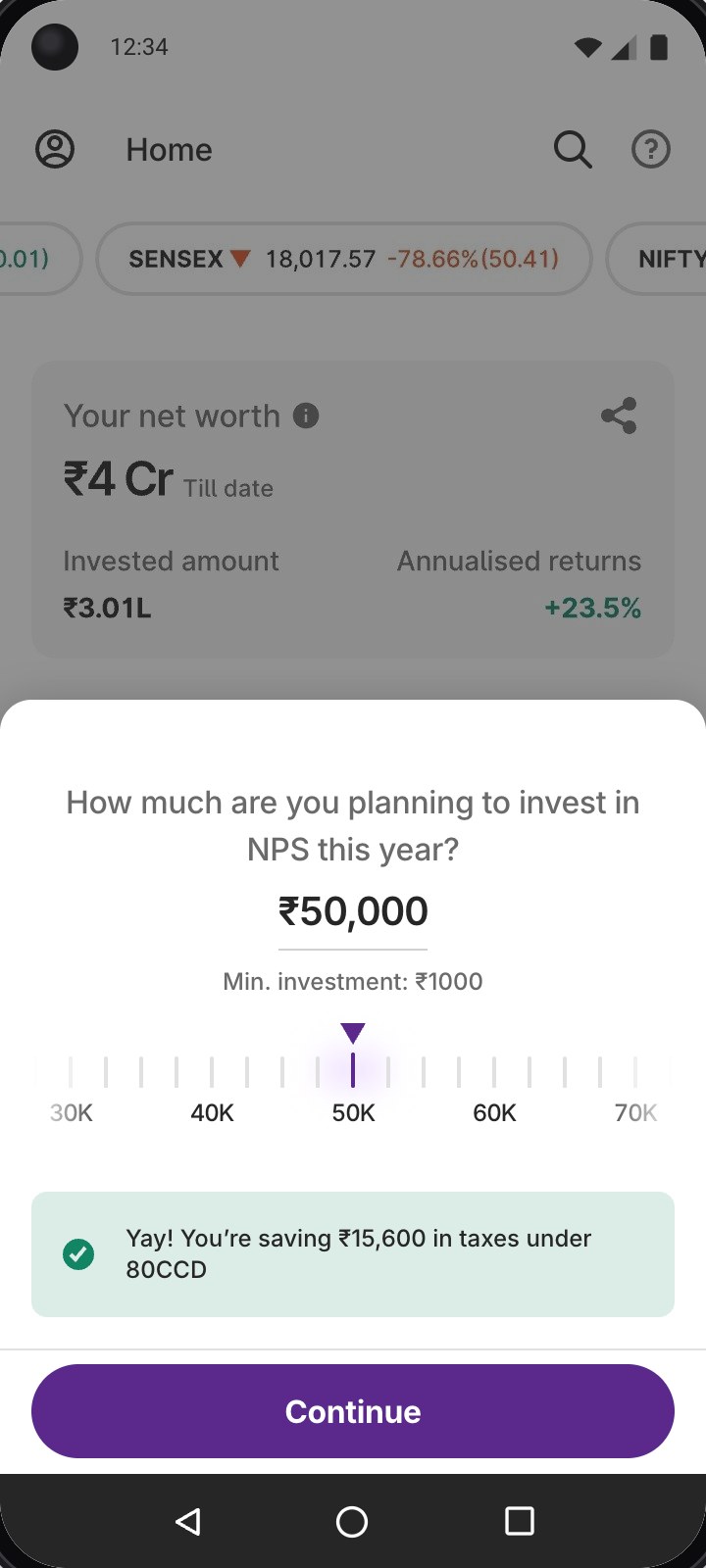
The journey opens with one question, how much this year and shows the tax saved as you set it. Explore keeps a tax meter on top.

Contribution sheet with the tax saving

03Pension funds were new to people

Two more numbers on every fund

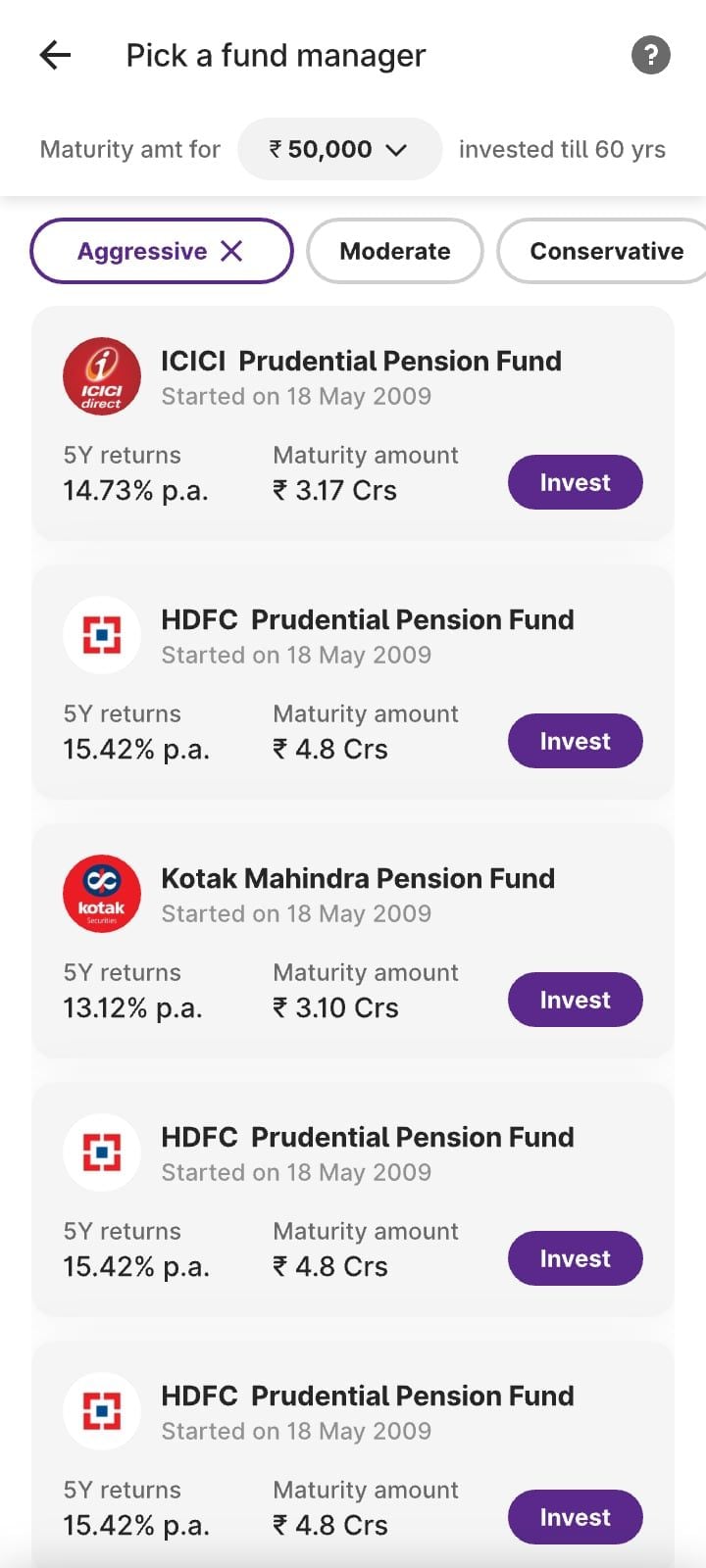
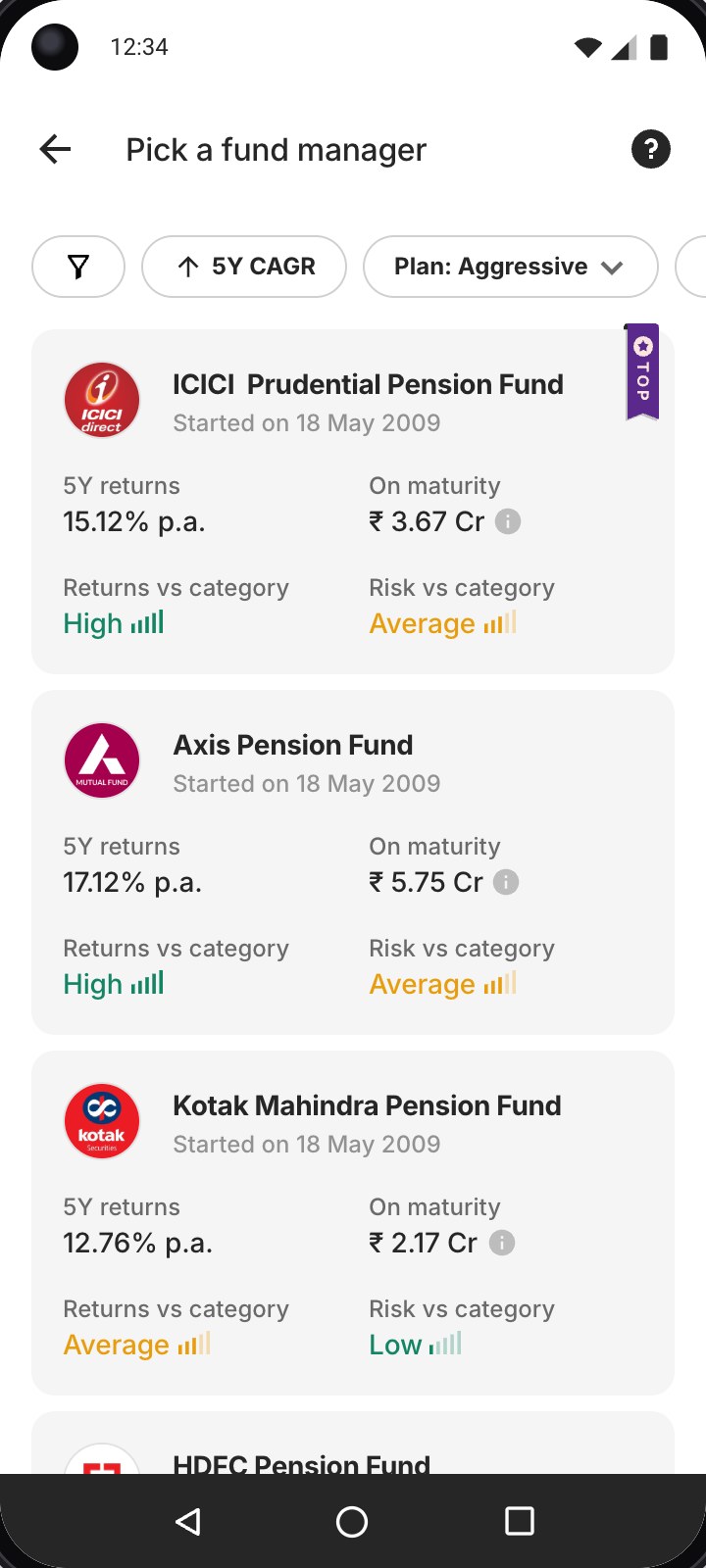
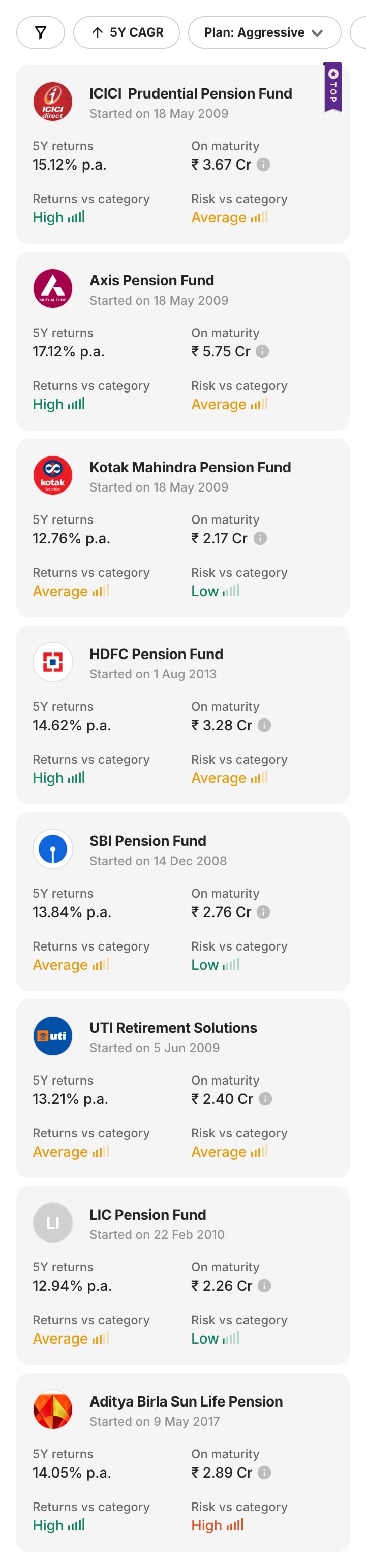
Returns vs category and risk vs category sit next to 5Y returns and maturity.

Fund list with returns and risk vs category

04People wanted to know why

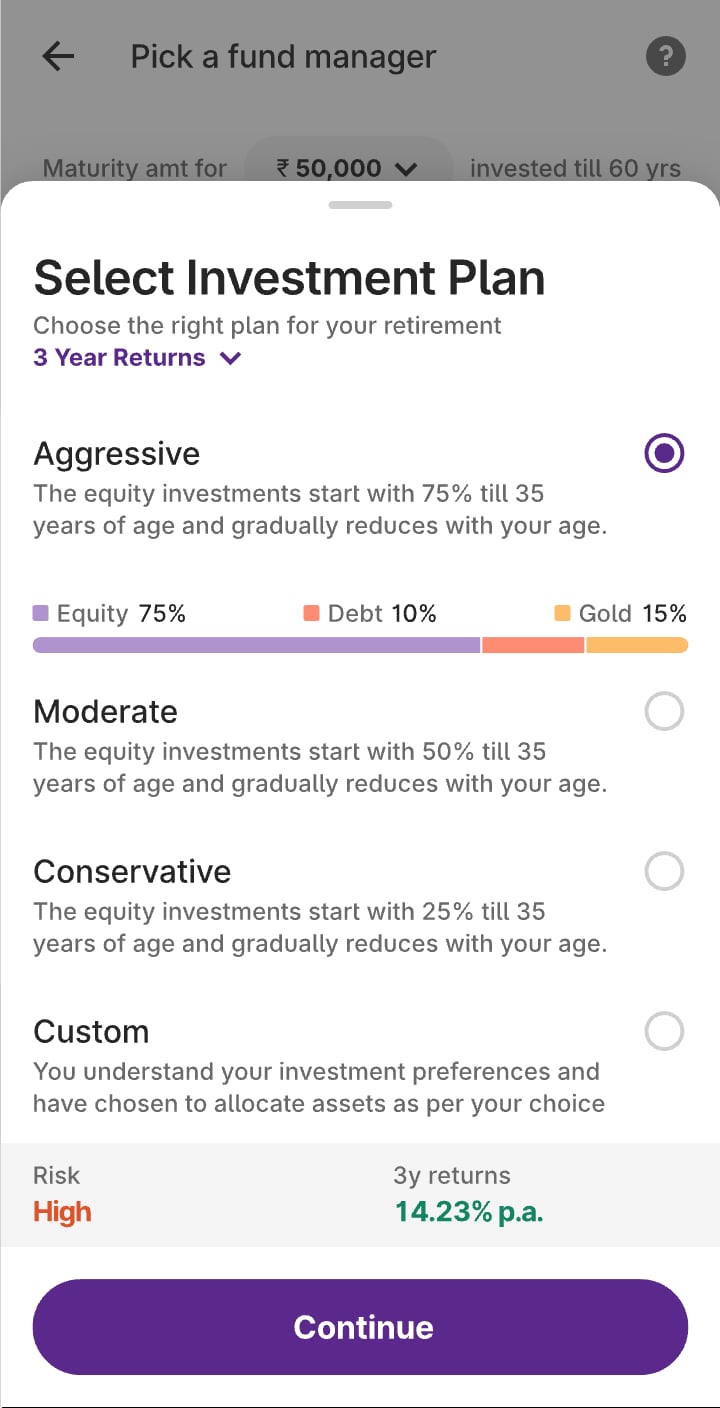
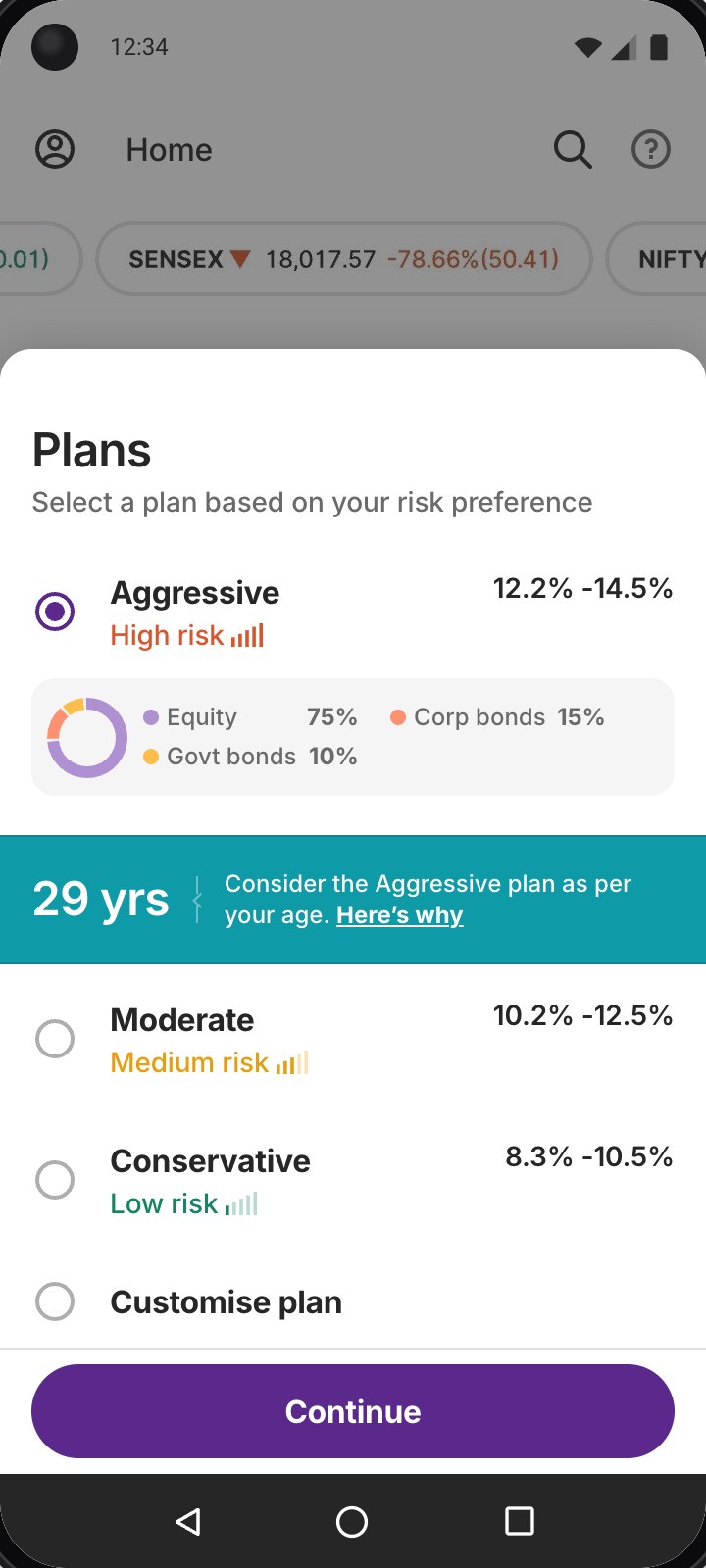
The plan became a step, with a reason

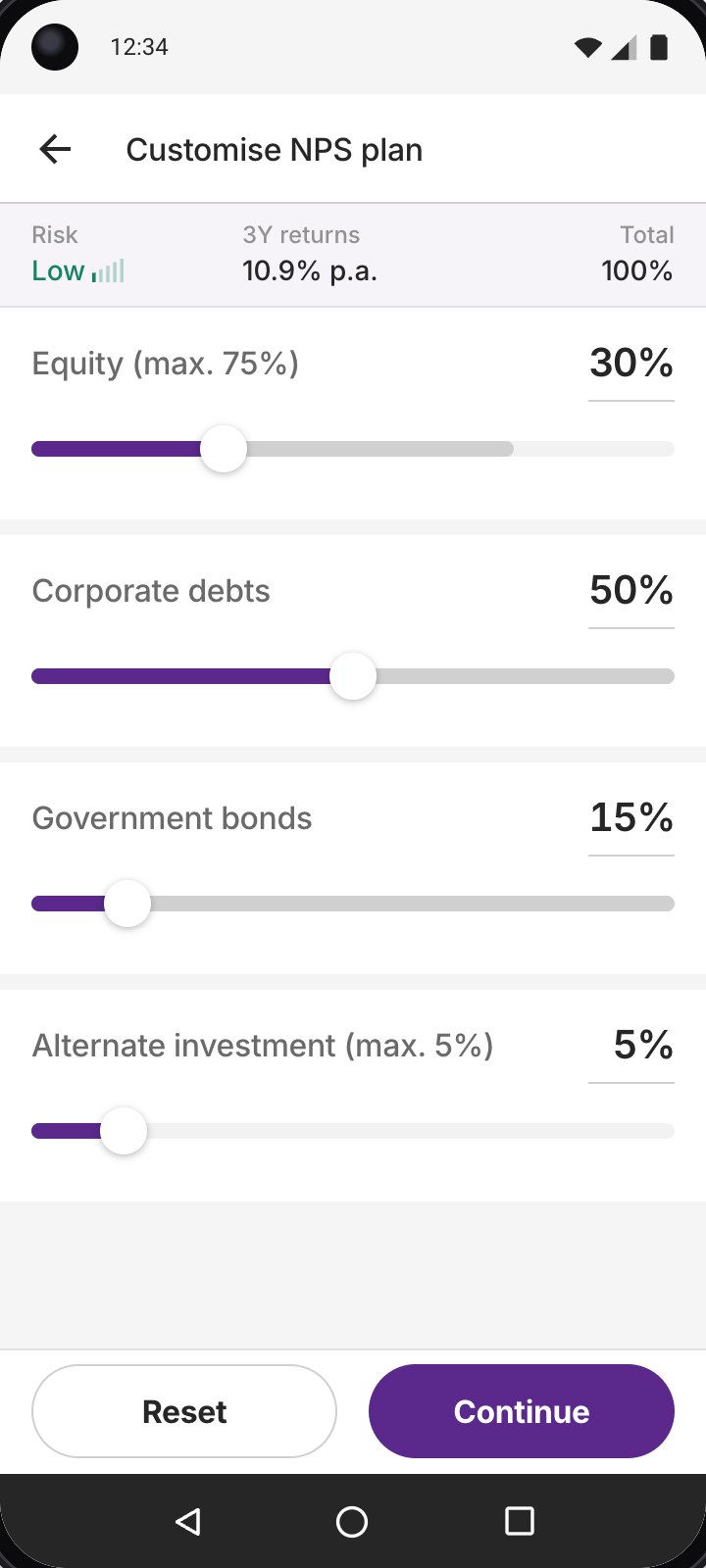
A plan is suggested for your age, with why and a clear way to switch or customise.

Plans step: Aggressive suggested at 29, with the reason

05Maturity mattered more than CAGR

Maturity first, no calculator

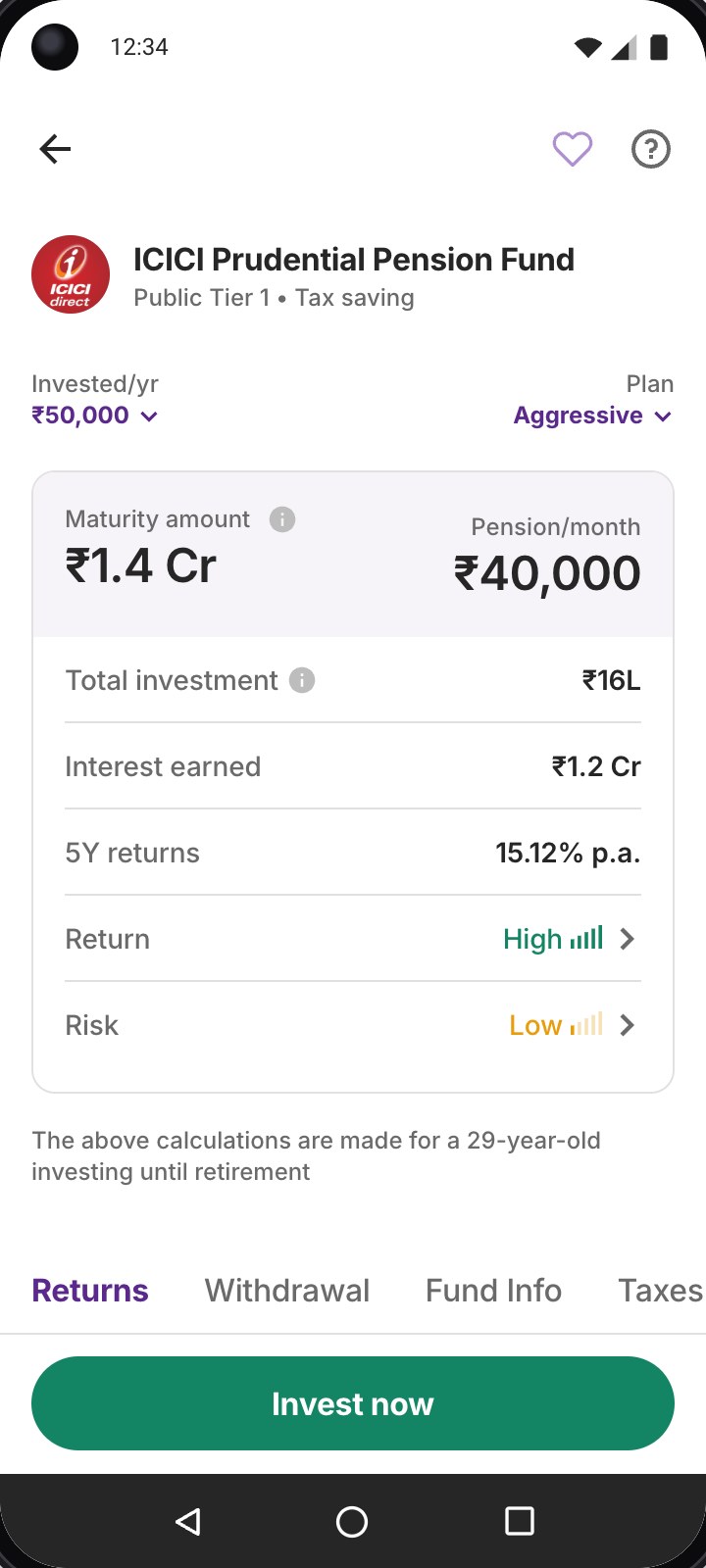
Fund details open on the maturity amount and monthly pension. Amount and plan are two dropdowns.

Fund details with maturity amount and pension first

06People asked how NPS compares

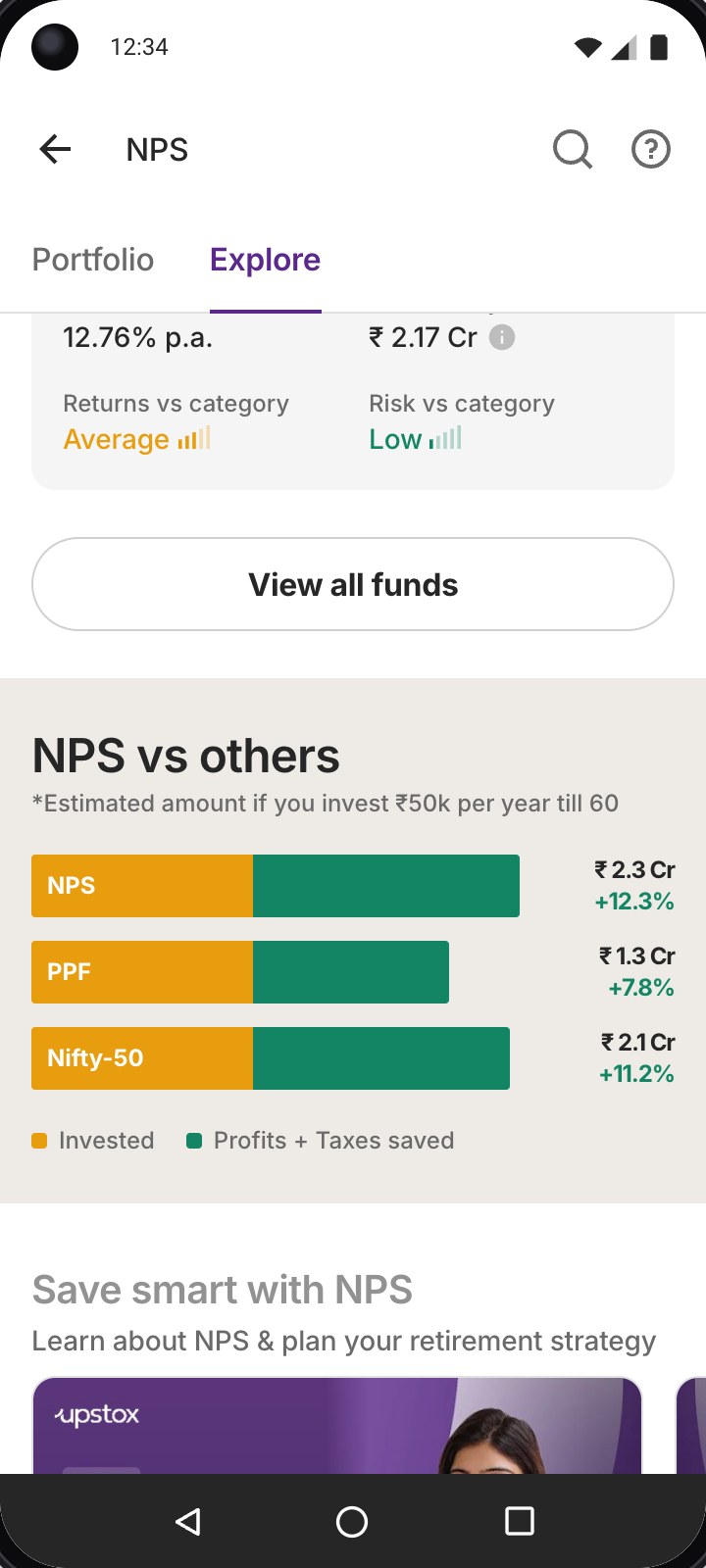
NPS vs others, on Explore

The same yearly amount till 60 in NPS, PPF and a Nifty 50 index, so people can see the difference without a calculator.

Explore: NPS vs PPF and Nifty 50 for ₹50,000 a year till 60

[ Key design decisions ]

Four principles, six decisions

Testing set the direction. These are the decisions that shipped, each grouped under the principle behind it, with the reasoning that got it there.

  1. Jargon-free decisions

    NPS concepts in plain language, close to the point where a decision is made.

  2. Seamless account opening

    Existing Upstox information where possible, with account setup inside the investment journey.

  3. Transparent pricing

    Applicable charges and the total amount, before the user confirms.

  4. Insightful portfolio tracking

    PRAN, orders, holdings and investment progress, visible after purchase.

01Jargon-free decisions

Start with the tax benefit, not a form

Why
Most people come to NPS for the tax break and testing showed they didn’t know what it was worth to them. One question up front, how much this year, answers that before anything else is asked.
What we did
A slider lands on ₹50,000, the 80CCD(1B) limit and shows the saving as it moves. Explore keeps a tax meter on top, so the benefit stays in view while people browse.
Contribution sheet: how much are you planning to invest in NPS this year
Explore: tax meter, top funds, NPS vs others, videos and FAQs

Scroll the screen
02Jargon-free decisions

Suggest a plan and say why

Why
Equity, corporate bonds and government securities in shifting proportions is a lot to judge cold. In testing, people wanted the default explained, not tucked away.
What we did
Age sets a starting plan. At 29 that’s Aggressive, with the reason right next to it and a clear way to switch or build a custom mix within the rules.
Plans sheet: Aggressive suggested for a 29-year-old, with the reason

03Jargon-free decisions

Make funds comparable at a glance

Why
Ten pension fund managers, most of them unfamiliar names. People needed more than returns to trust a pick and they wanted to know what they’d end up with.
What we did
The list is sorted by 5Y CAGR for your amount and horizon, with returns and risk against the category and the corpus at maturity on every card. Fund details open on the maturity amount and monthly pension.
Fund managers ranked by 5Y CAGR with maturity amount and risk vs category

Scroll the screen
Fund details: maturity and pension first, then returns, withdrawal, fund info and taxes

Scroll the screen
04Seamless account opening

Ask only for what we don’t already know

Why
Opening NPS elsewhere means a separate form, OTPs and a wait for a PRAN. Upstox already holds most of those details from KYC, so asking again would be friction for nothing.
What we did
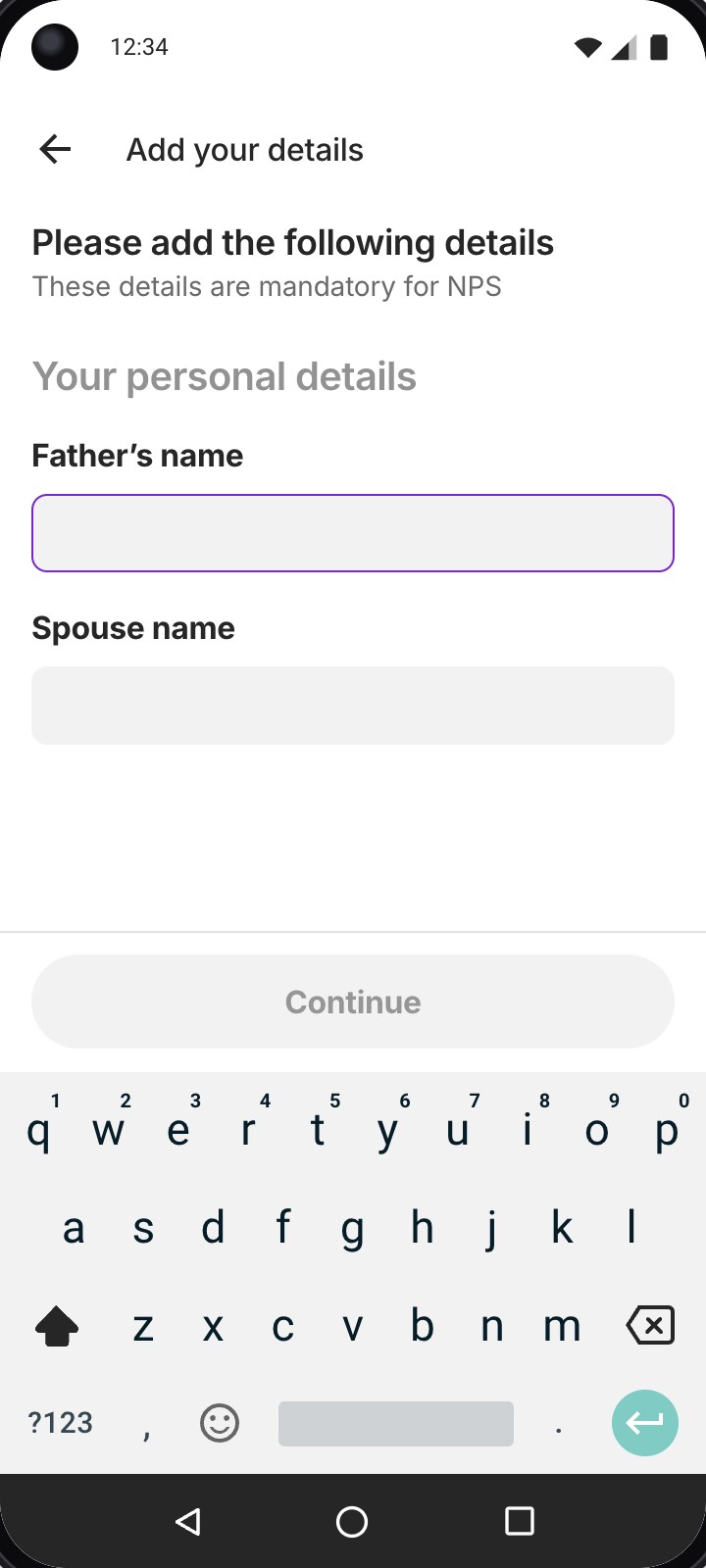
Of the 22 fields a PRAN needs, 17 come from Upstox. The order asks only for the rest, like a father’s or spouse’s name and the PRAN is created in the background.

17 of 22 fields known before the user types anything

Personal details: only the fields Upstox doesn’t already have

05Transparent pricing

Show every charge before money moves

Why
NPS carries around 30 kinds of charges across its intermediaries. A surprise at payment is the fastest way to lose trust in something people lock money into until 60.
What we did
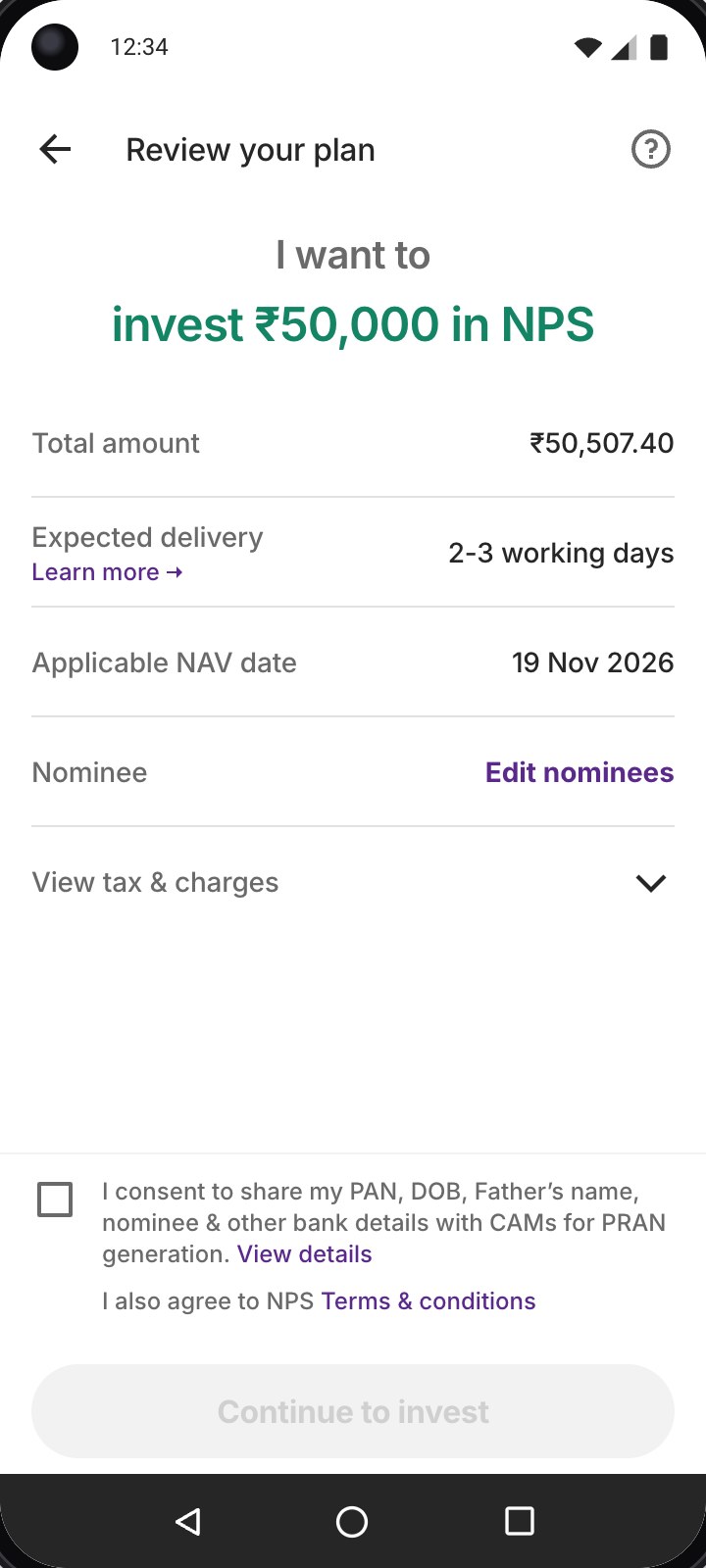
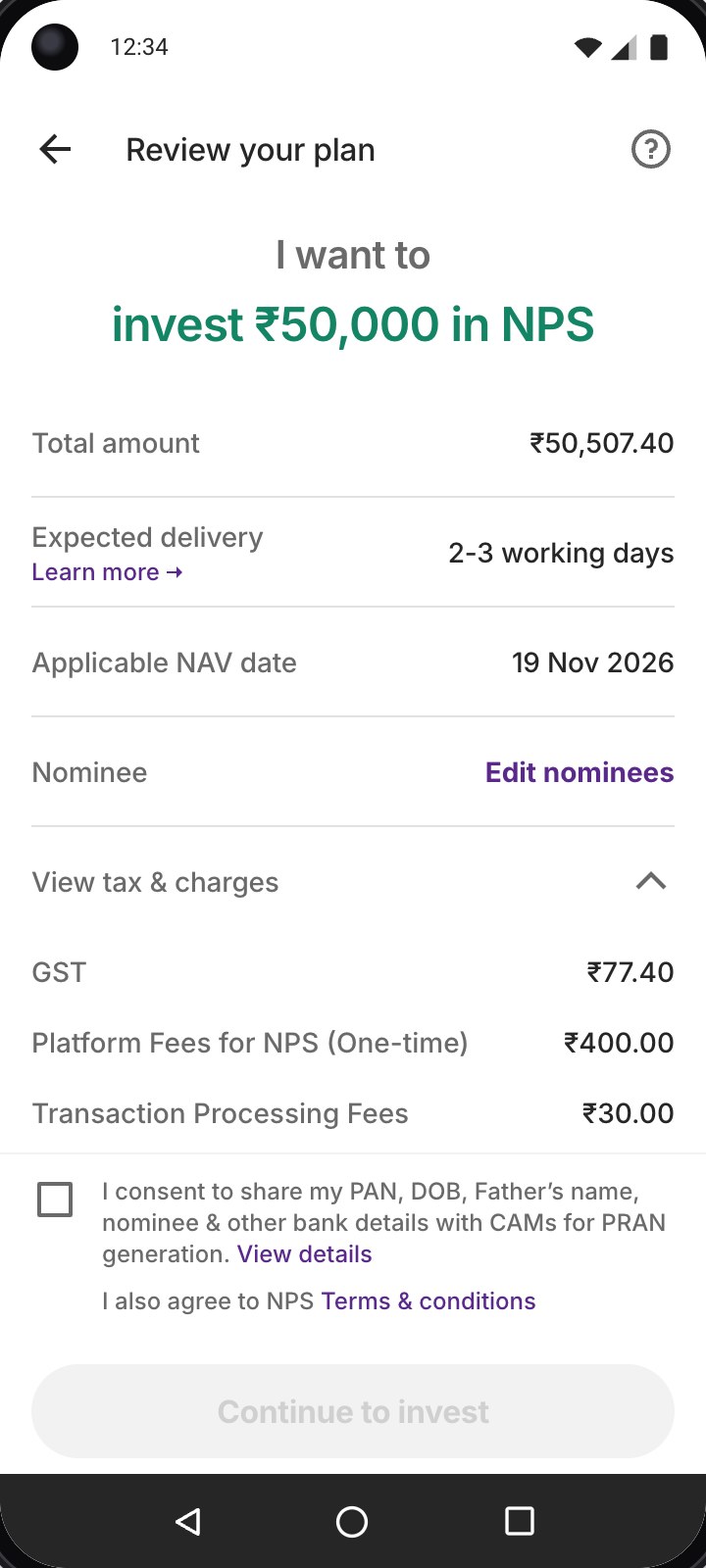
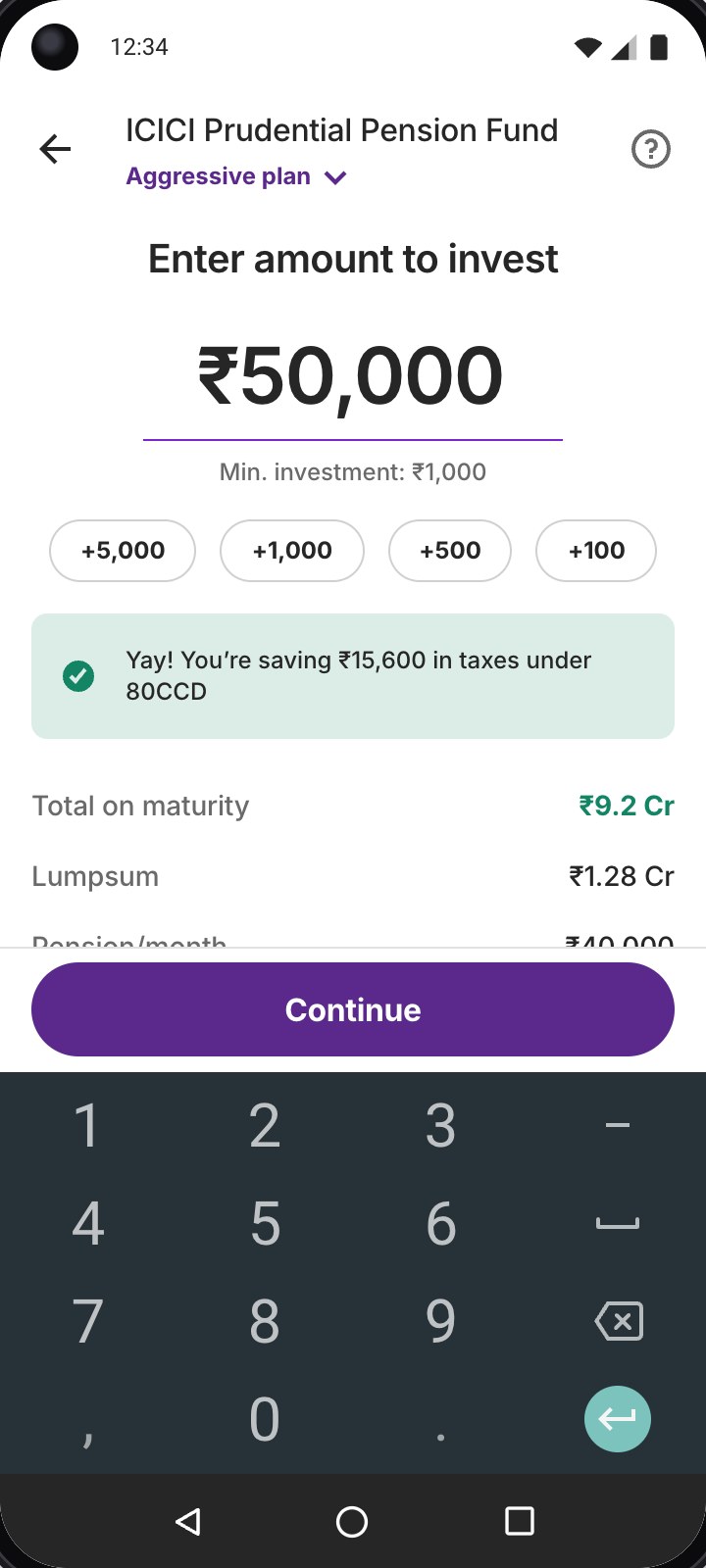
Review shows the amount, the applicable charges and the total, ₹50,507 for ₹50,000, with one consent placed next to the details it covers.
Review: invest ₹50,000, total ₹50,507, with consent to share details with CAMS

Tap “View tax & charges”

06Insightful portfolio tracking

Make the wait after payment useful

Why
Units arrive a few days after payment and a PRAN is new to most people. Without a status, that gap feels like the money went missing.
What we did
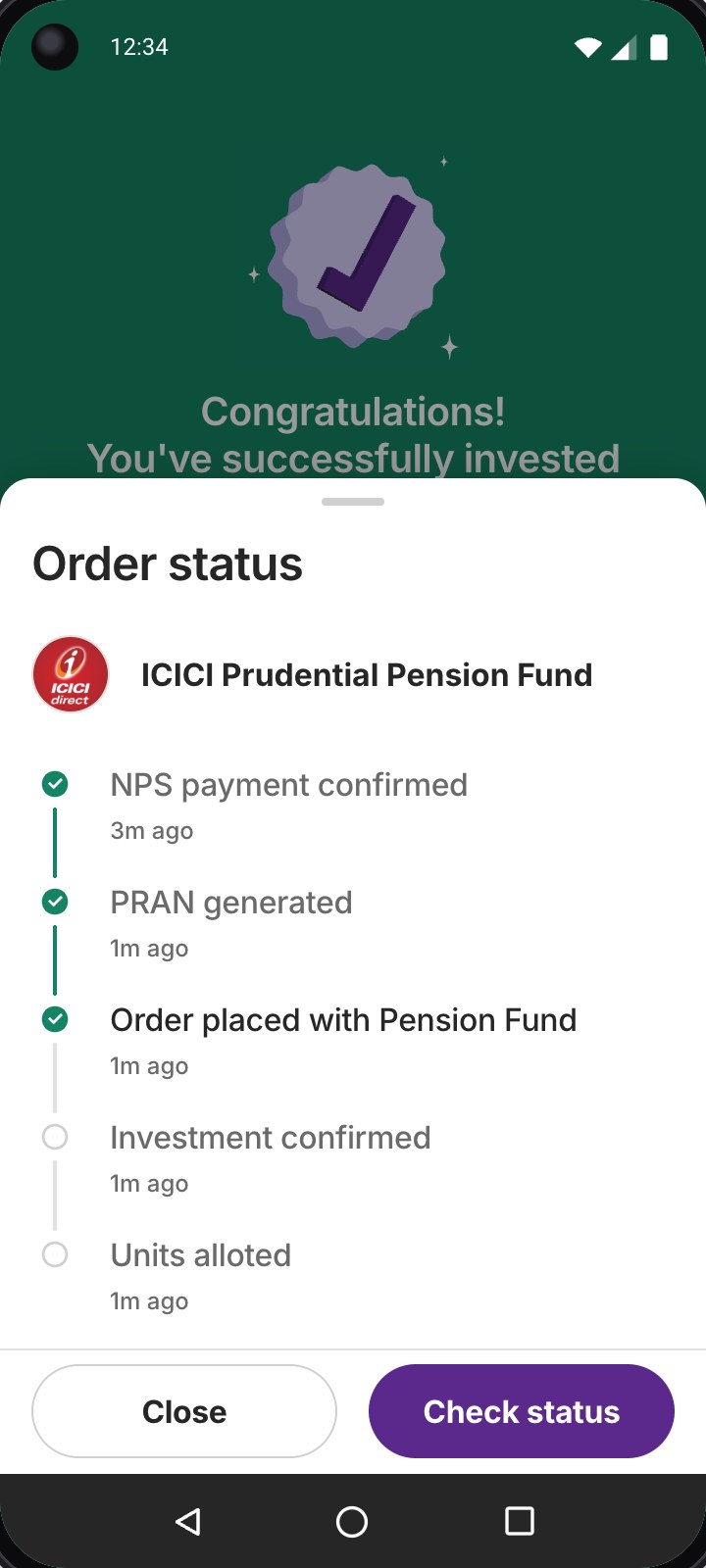
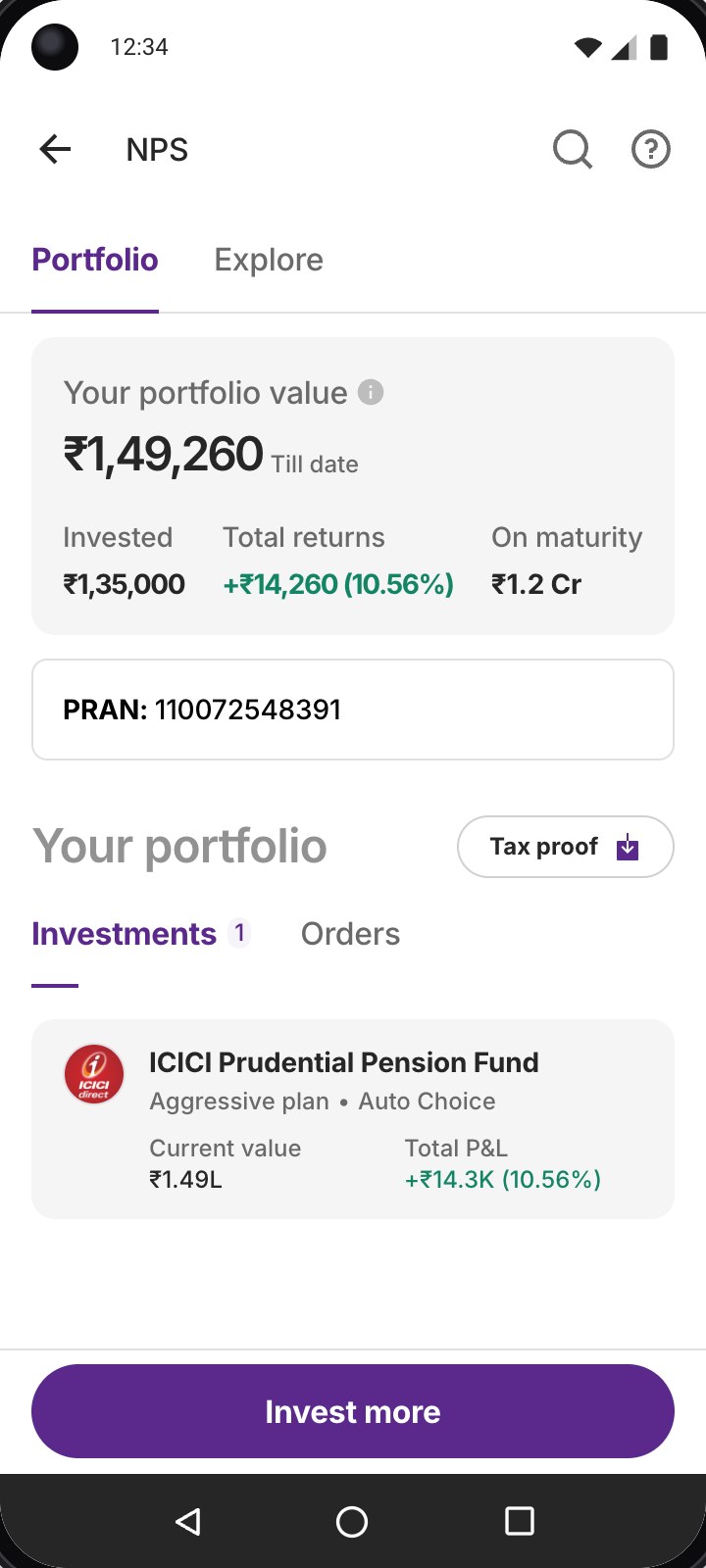
A live checklist runs from payment to PRAN to units allotted. Portfolio then brings value, returns, PRAN and holdings into one place to come back to.
Order status: payment confirmed, PRAN generated, order placed
NPS portfolio with value, returns, PRAN and holdings

[ The experience ]

From discovery to portfolio, in one connected journey

Twelve screens across six stages: discover, contribute, choose, set up, invest and track.

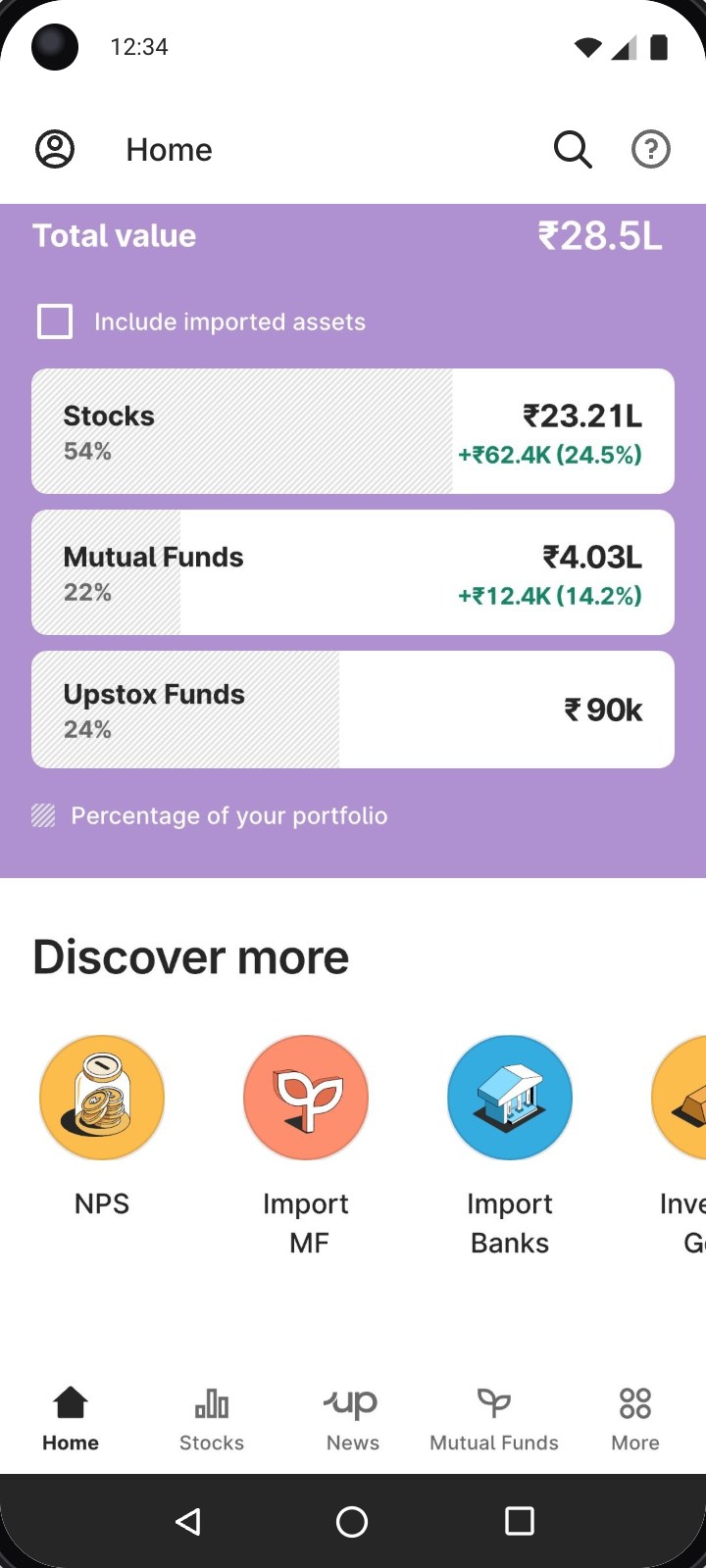
1DiscoverFind NPS on Home, under Discover more
Find NPS on Home, under Discover more
2ContributeSet this year’s contribution
Set this year’s contribution
3ChooseReview the plan suggested for your age
Review the plan suggested for your age
4ChooseOr customise within the rules
Or customise within the rules
5ChooseExplore, with the tax meter on top
Explore, with the tax meter on top
6ChooseCompare fund managers
Compare fund managers
7ChooseFund details, maturity and pension
Fund details, maturity and pension
8InvestEnter an amount
Enter an amount
9Set upFill only what’s missing
Fill only what’s missing
10InvestReview, with charges and consent
Review, with charges and consent

Tap “View tax & charges”

11TrackFollow the order status
Follow the order status
12TrackSee it in Portfolio
See it in Portfolio

Up close: understanding NPS before the first rupee

Stories in the Discover stage cover what people want to know before they commit: what they save, how it works, when money comes out and what it earns.

Introducing

National Pension
Scheme

Government-backed retirement savings

Save tax up to

₹15,600

On ₹50k, under 80CCD(1)

Additionally, save up to ₹46,800Using ₹1.5 L as an alternate to 80C

Save ₹15,600 in taxes

Tap to skip · hold to pause

Try it and flip the branches I designed

The real flow, built from the Figma designs. Set a scenario beside the phone to see what changes, or open it full screen.

[ The launch ]

NPS went live to all Upstox users

It launched in March 2025, before the end of tax season and reached 100% of users, with organic discovery and no marketing push. The numbers so far.

₹34.6 Cr

assets under management

96.4K

NPS accounts created

9.7L+

orders completed

Under 3 min

from first tap to first contribution, 9× faster than Protean and other apps

₹4.82 Cr

total order amount

₹16.66L

account-opening fees collected

[ Beyond the first release ]

We launched at 7 stars, on purpose

Three weeks of design left little room and missing tax season meant waiting another year for the people who needed NPS most. So we drew the line at 7★, cut what could wait and planned the rest for after launch.

Taking a regulated product live

Presented to PFRDA with the product manager, at our Mumbai office

Application

Jan 2025

Registration

Jan 2025

Security deposit

Feb 2025

POP licence

Feb 2025

CRA registration

Mar 2025

Shipped in March 2025

Everything up to 7★

Enough for someone to understand NPS, invest for the tax benefit and keep track of it afterwards.

3★

  • Tier I opening and investing
  • Charges visible
  • Plan selection

5★

  • Education on investing right
  • NPS calculator

7★

  • Portfolio tracking
  • Statements and holdings
Held for after launch

11★

Once NPS was live and meeting the tax-season deadline was behind us, we had room to work these out properly.

  • Corporate NPS

    Contributions made through an employer, alongside your own

  • Account shifting

    Moving an existing NPS account to Upstox from another provider

After launch

The 11★ flows, designed

The happy path of each, from the design file.

Corporate NPS

The employer’s email leads to Upstox, the corporate account links and the new plan and holdings appear in Portfolio.

Account shifting

From a banner on Explore: enter the PRAN, confirm the transfer and the existing holdings land in Portfolio.

Launch result · Corporate NPS

Within three months of launch

50+Corporate accounts opened
₹26 LWorth of orders every month
What I took away

Building NPS from zero meant making decisions before there was a product pattern to follow. The work wasn’t about removing every detail from a complex financial product. It was about deciding what people needed to understand at each step, what the product could handle in the background and where transparency and control had to stay with the user.

Try it

Live on Upstox

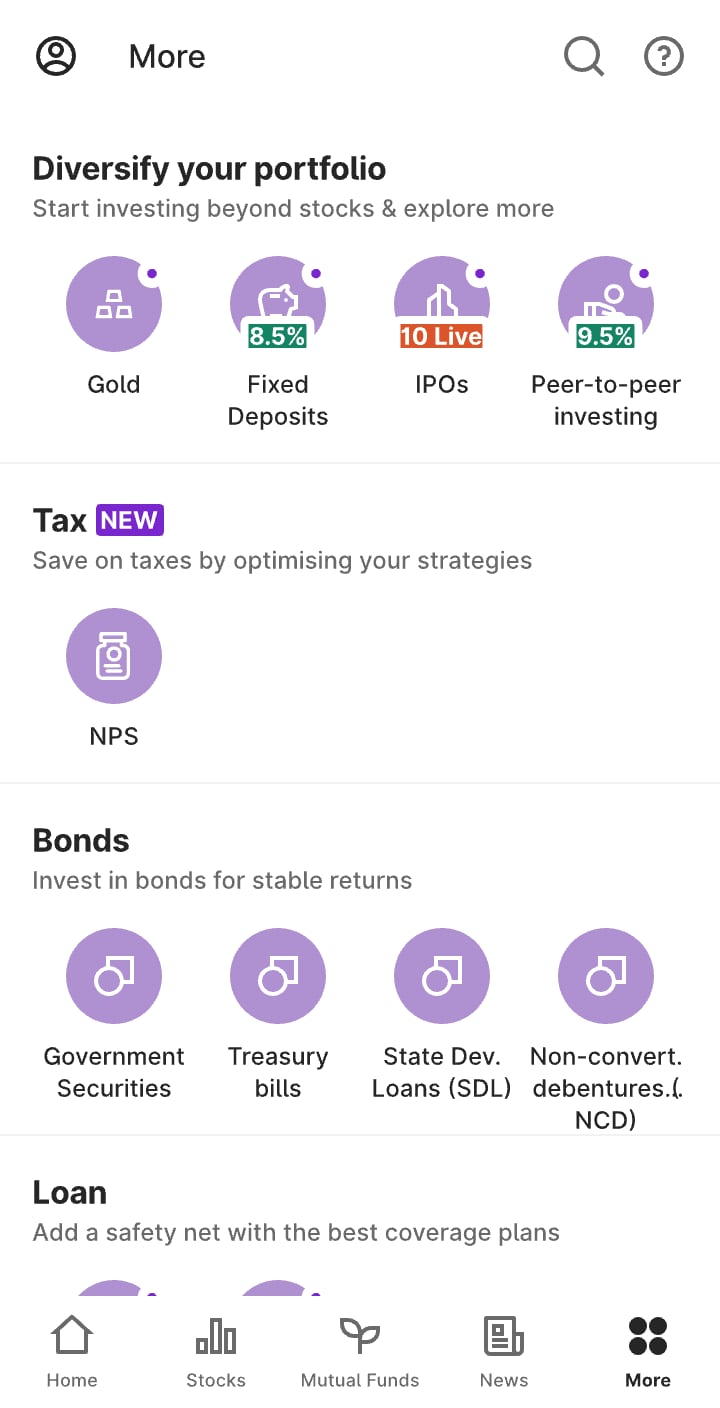
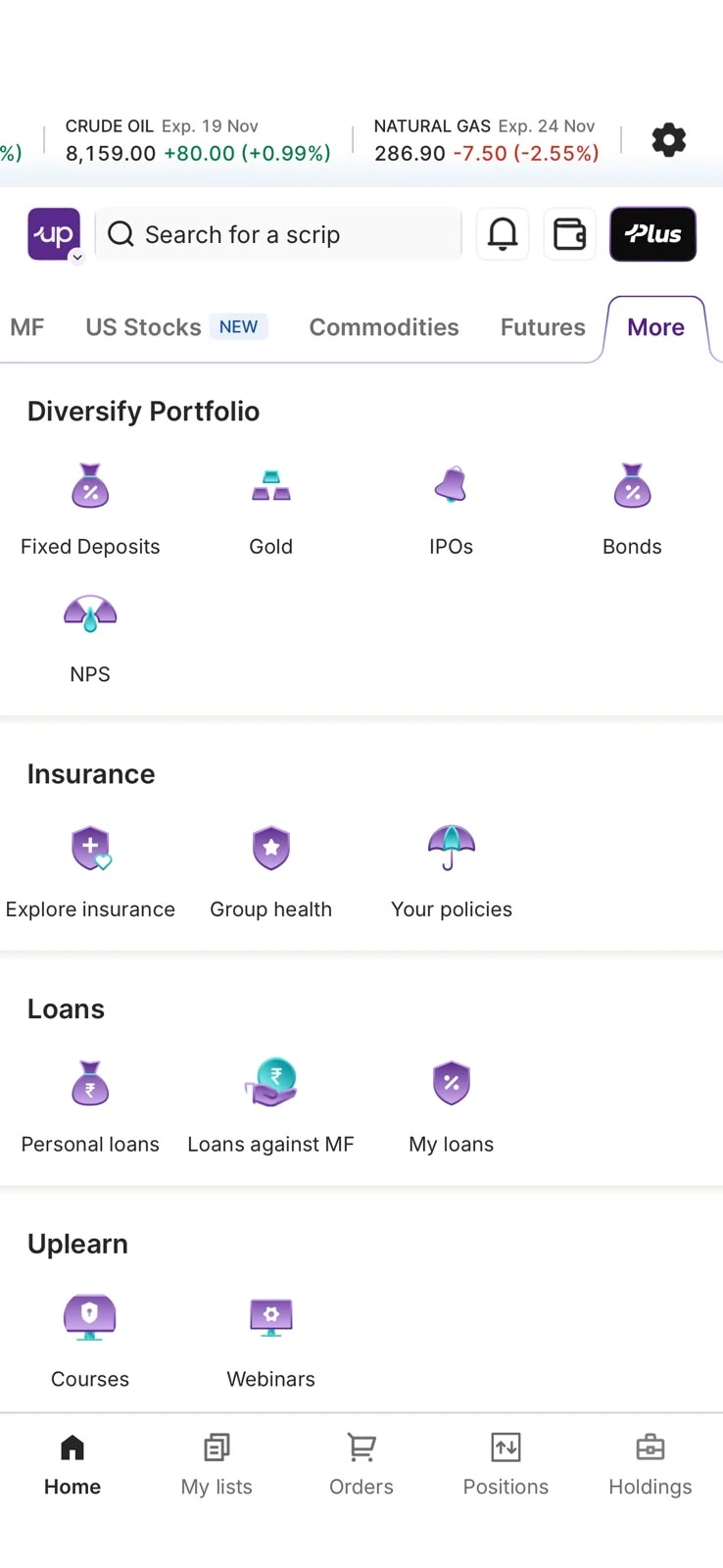
Open the app, go to More and tap NPS under Diversify Portfolio.

The More tab in the Upstox app, with NPS under Diversify Portfolio

[ Next case study ]

Tata CLiQ

Before Upstox: beauty, luxury and a marketplace

Four products from my years at Tata CLiQ: a beauty homepage that re-themes for every sale, a shoppable luxury magazine, filters and a seller portal.

+11.5%
Homepage orders (Palette)
+6.5%
Conversion (Luxe Editorial)
−60%
Seller onboarding time
Sal · Lead product designer, UpstoxNPS · 2025
Salaath ShaikhPortfolio — 2026
Loading the work000